
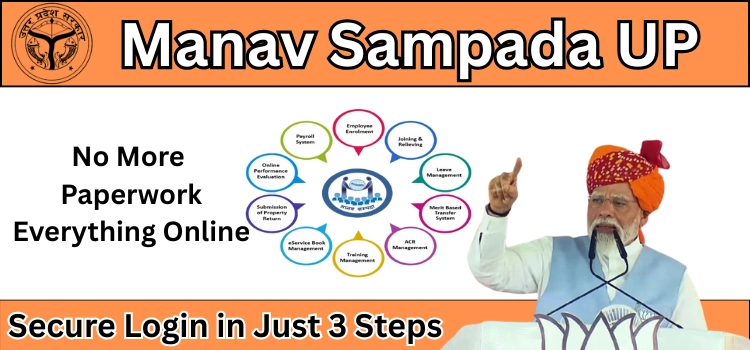
For over 1.7 million government employees in Uttar Pradesh, the Manav Sampada portal (eHRMS UPSDC) serves as the primary digital platform for managing their professional journey. From recruitment to retirement, it centralizes all HR processes, making management efficient, transparent, and secure. The September 2025 upgrade has made the portal more user-friendly, feature-rich, and highly secure.
This Manav Sampada UP guide provides step-by-step instructions for Manav Sampada eHRMS login, insights into leave application processes, details on salary slips, digital service books, and a comprehensive look at public access features and mobile app integration.
What is Manav Sampada UP?
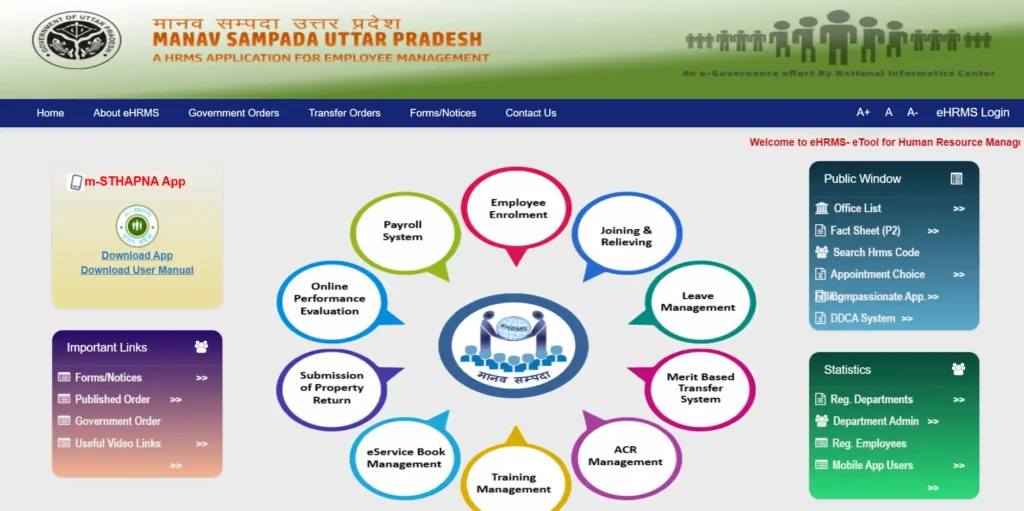
Manav Sampada is a state-of-the-art Human Resource Management System (HRMS) designed for government employees in Uttar Pradesh. It automates HR operations such as:
- Employee data management
- Leave applications and approvals
- Payroll management and salary slips
- Issuance of official orders and notifications
The system is designed to reduce paperwork, enhance transparency, and empower employees to access and manage their records digitally.
Key Features of Manav Sampada Portal
1. Centralized Employee Management
All employee information, including personal details, employment history, and official records, is stored securely in a centralized database. Departments can verify and update employee data efficiently, while employees can access their records anytime via the portal. Also read EPFO Unified Portal for more employees services.
2. Leave Management
The Manav Sampada leave module allows employees to apply for leave, track its status, and receive approvals digitally. It supports various types of leave such as Casual, Medical, Earned, Maternity, Childcare, and Study Leave.
3. Salary Slips
Employees can download their salary slips directly from the portal. The Manav Sampada portal salary slip feature ensures payroll transparency and enables employees to maintain accurate financial records.
4. Official Orders (Aadesh)
The Manav Sampada aadesh feature allows employees to receive official orders and notifications online. This ensures timely communication and reduces dependency on manual circulars.
5. Mobile App Accessibility
The Manav Sampada app provides on-the-go access to HR services. Employees can check their service records, download salary slips, and apply for leave from their smartphones, increasing convenience and efficiency.
Manav Sampada UP Basic Education
Manav Sampada UP Basic Education is an online HR system for teachers and staff in Uttar Pradesh. It helps manage everything about your job digitally – like salary, leave, transfers, and service records.
Main Things You Can Do:
- Salary Slip – See and download your monthly salary online.
- Leave Application – Apply for casual, medical, maternity, or other leaves online.
- Service Book – Your entire career record (promotions, transfers, etc.) is stored digitally.
- Official Orders – Get government notifications and orders directly in the portal.
- Mobile Access – Use the m-STHAPANA app to check everything on your phone.
Manav Sampada ehrms.upsdc.gov.in Login
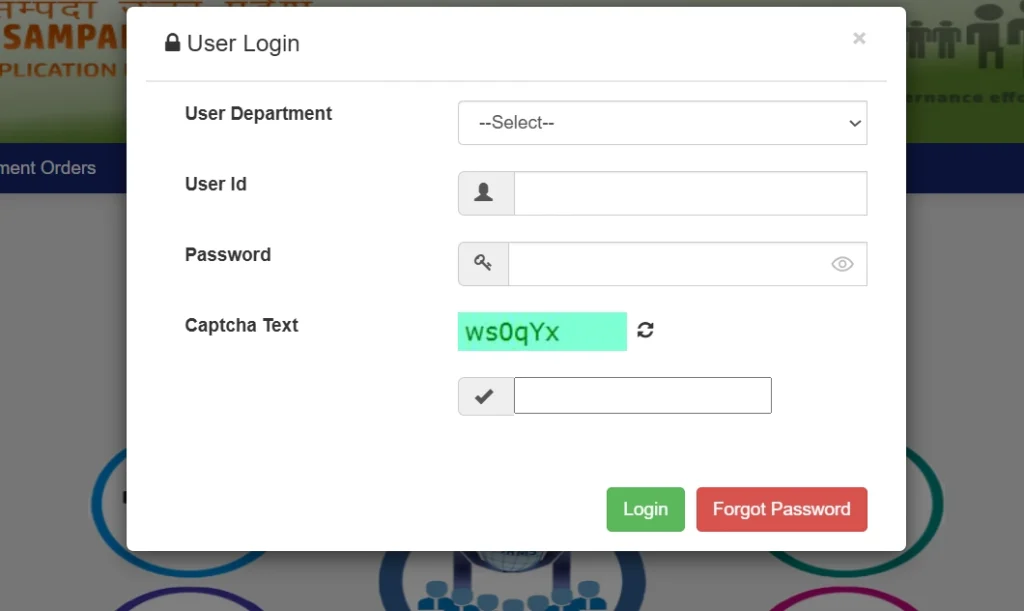
Navigating the UP Manav Sampada eHRMS login process correctly is crucial for all government employees. Following the steps below will ensure secure access to your account while avoiding common login errors.
Step 1: Access the Official Portal Securely
Cybersecurity is essential when accessing your sensitive HR data. Always start your session from the official portal to prevent phishing attacks.
Action:
- Open a modern web browser such as Google Chrome, Mozilla Firefox, or Microsoft Edge.
- Manually enter the official URL: ehrms.upsdc.gov.in in the address bar.
Tip: Avoid clicking links from emails or search results to reduce the risk of fraud.
Step 2: Select Your Correct Department (2025 Update)
The 2025 update introduced a standardized department coding system, which ensures your login request is routed to the proper authentication server. Selecting the correct code reduces “User Not Found” errors.
Example Department Codes:
| Department Code | Department Name |
| EDUBASIC | Basic Education Department (Teachers) |
| MEDHLTH | Medical & Health Services |
| REVUE | Revenue Department |
| POLICE | Police Department |
| HORTI | Horticulture Department |
| FOREST | Forest Department |
Pro Tip: Double-check your department code before proceeding to login.
Step 3: Enter Your Login Credentials Accurately
This step is critical for successful login. Make sure all information is entered exactly as required.
- User ID: Enter your official 8-digit Employee ID (e.g., 12345678), found on your appointment letter or government ID card.
- Password:
- First-Time Users: Use the default password: first 3 letters of your name in uppercase + birth year (YYYY).
- Example: Amit Kumar, born 1990 → AMI1990
- Example: Amit Kumar, born 1990 → AMI1990
- Returning Users: Enter the password you created during your first login.
- First-Time Users: Use the default password: first 3 letters of your name in uppercase + birth year (YYYY).
- CAPTCHA: The 2025 portal introduces a Devanagari script CAPTCHA. Enter it exactly as displayed, paying attention to letter case.
Tip: Accuracy here is key. Mistyped credentials can temporarily lock your account.
Step 4: Finalize Login and Secure Your Account
- Double-check all details and click the Login button.
- First-Time Login: The system will prompt you to change your default password. This is mandatory.
- Password Expiry: All passwords now expire every 90 days, with on-screen and email reminders for updates.
Manav Sampada Leave Application – 2025 NIC Compliance
The leave module ensures employees can apply and track leave digitally. The September 2025 update introduces stricter NIC compliance rules.
Step 1: Secure Login
Log in using the steps above. Expired passwords will restrict access.
Step 2: Navigate to Leave Module
- Dashboard → Employee Services (सेवाएं) → Self-Service (स्व सेवा) → Apply for Leave (अवकाश के लिए आवेदन करें)
Step 3: Complete Leave Form
- Select Leave Type: Medical, Earned, Casual, Maternity, Childcare, Study Leave
- Enter Dates: Select From and To dates accurately
- Provide Reason: Be concise and professional
Step 4: Upload Required Documents
Applications without proper documents are automatically rejected.
| Leave Type | Required Documents | Compliance Tip |
| Medical | RMP Certificate + reports | Certificate must be issued within 48 hours |
| Maternity | Hospital proof + Aadhaar-linked certificate | Submit before delivery date |
| Childcare | Child’s birth certificate + school note | For children under 12 |
| Study | Admission letter from recognized institute | Max 2 years cumulative |
Tips:
- PDFs size less than 2MB
- Clear file names, e.g., Medical_Certificate_AmitKumar.pdf
Step 5: Review and Submit
Check all details before submitting. Save the unique application reference number for tracking.
Portal Optimization and Security Tips
- Always access via official portal: ehrms.upsdc.gov.in
- Use updated browsers to prevent compatibility issues.
- Enable two-factor authentication if available.
- Regularly download salary slips and service records for personal backup.
- Report technical issues promptly to NIC support.
Secure Manav Sampada UP Login 2025 – Finding Your ID & Password
Before accessing the portal’s features, you need secure login credentials. Unlike other platforms, your Manav Sampada User ID is officially assigned by your department.
Step 1: Locate Your Official User ID
Your unique User ID is provided by your department’s nodal officer. It typically comes in one of these formats:
- Employee ID: An 8-digit number or specific alphanumeric code (e.g., UPBED/2020/XXXXX)
- Registered Mobile Number: The mobile number submitted during profile creation can often be used as the login ID.
Pro Tip: If unsure, contact your department’s HR or the designated Manav Sampada Nodal Officer for accurate credentials.
Step 2: Generate and Use Your Default Password
First-time users are provided a default password, which must be changed immediately for 2025 security compliance.
Default Password Format (2025):
- First 3 letters of your first name (uppercase, in English) + 4-digit birth year
Example:
- Employee Name: Rajesh Kumar
- Year of Birth: 1981
- Default Password: RAJ1981
Action: Visit ehrms.upsdc.gov.in, enter your credentials, and follow the on-screen prompt to set a strong, NIC-compliant password.
Password Creation Rules (NIC Compliance)
Your new password must include:
- Uppercase letters (A–Z)
- Lowercase letters (a–z)
- Numbers (0–9)
- Special Characters (!, @, #, $, etc.)
Avoid: Personal information such as name, birthdate, or simple sequences like “password123”.
Downloading Your Encrypted Manav Sampada Salary Slip (2025 Security Protocol)
The 2025 protocol ensures that salary slips are secure, tamper-proof, and verifiable. Simple PDF downloads without security measures are now replaced with encrypted, authenticated files.
Mandatory Access Requirements
- An active SSO (Single Sign-On) login account
- Employment status marked as ‘Active’
- Mobile number and email registered for OTP validation
Step-by-Step Download Guide
- Login: Access the official portal at ehrms.upsdc.gov.in.
- Navigate to Payroll: Dashboard → Employee Services → Payroll Management → Salary Slips.
- Generate & Download: Select the financial year (e.g., 2024–2025) and desired month, then click Download.
Security Features of Salary Slips
- NIC Digital Signature & Watermark: Prevents unauthorized reproduction and ensures authenticity.
- QR Code Verification: Allows instant verification without logging into the portal.
- Automatic Email Copy: A secure copy is sent to your registered official email for permanent record-keeping.
Accessing Your Digital e-Service Book
The digital service book records your entire professional journey—from appointment to promotions—in a secure, immutable format.
Access Path: Dashboard → Service Records → Digital Service Book
2025 Security & Feature Enhancements
- Blockchain-Style Verification: Promotions and increments are cryptographically secured, making records tamper-evident and fully verifiable.
- Military-Grade Encryption (AES-256): Protects sensitive personal data at the highest security standard.
- NIC Digital Signatures: All entries are digitally signed by authorized officials, ensuring legal validity equivalent to physical signatures.
- Historical Archives: Original scanned service book pages are stored securely for reference and verification.
Public Access Features (No Login Required)
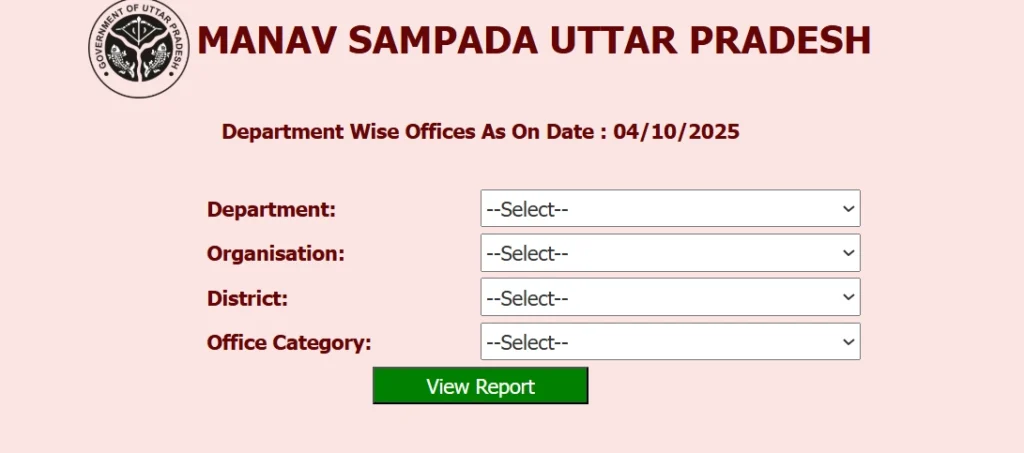
Some of Manav Sampada’s features are available to the public without login, promoting transparency and administrative efficiency.
Office List
- Visit the portal → Public Window / Janata Khata.
- Click Office List.
- Use filters to select Department, Organization, District, and Office Category.
- Click View Report → Download in PDF/Excel format.
Fact Sheet (P2) Report
- Navigate to eHRMS Public Window → Administrative Services → Fact Sheet (P2).
- Apply mandatory filters:
- Parent Department (e.g., Medical & Health)
- Organization (e.g., District Hospital)
- e-HRMS Code
- Parent Department (e.g., Medical & Health)
- Click Generate Report → Download PDF/Excel.
These reports are useful for administrative auditing, transparency, and data analysis.
Nationwide Impact & Success Stories
This is not just limited to Uttar Pradesh. Its success has influenced other states like Punjab, Haryana, Bihar, Maharashtra, and Kerala. The platform has created a unified HR ecosystem for government employees nationwide.
Real-Life Example
“Earlier, my pension file was stuck in manual processing for over 8 months. With Manav Sampada, I received my pension approval in just 6 days! This platform is a game-changer for every government employee, bringing transparency and speed we always hoped for.”
— Rajesh Kumar, Retired Teacher, Uttar Pradesh
This illustrates how is it has improved efficiency, transparency, and employee satisfaction.
Key Departments
- EDUBASIC: Basic Education Department (Teachers)
- MEDHLTH: Medical & Health Services
- POLICE: Police Department
- REVUE: Revenue Department
- PWD: Public Works Department
The platform is used by over 36 major departments across उत्तर प्रदेश, making it the most comprehensive state HRMS in India.
Detailed Manav Sampada Leave Types and Application Workflow
The leave module is designed to handle multiple types of leave efficiently. The September 2025 update introduced NIC-compliant processes ensuring applications are accurate, secure, and traceable.
1. Casual Leave
- Eligibility: Employees earn casual leave based on department rules.
- Application: Login → Employee Services → Apply for Leave → Select Casual Leave → Fill dates and reason.
- Approval: Supervisor reviews and approves within 2–3 working days.
2. Earned Leave
- Eligibility: Based on cumulative service and leave balance.
- Application: Requires accurate balance check; system prevents over-application.
- Documents: None required unless extending beyond standard rules.
3. Medical Leave
- Mandatory Documents: RMP certificate + supporting medical reports (issued within 48 hours).
- Application Tip: Briefly state the nature of the illness. Avoid vague phrases.
- Approval Workflow: Automatic validation of certificate date; supervisor approval required.
4. Maternity Leave
- Eligibility: Female employees; duration as per government norms.
- Documents: Hospital proof + Aadhaar-linked certificate; submit before delivery date for payroll processing.
5. Childcare Leave
- Eligibility: Employees with children under 12 years.
- Documents: Child’s birth certificate + school note on official letterhead.
- Application: Must mention reason and duration; system checks age compliance automatically.
6. Study Leave
- Eligibility: Employees pursuing recognized educational programs relevant to service.
- Documents: Admission letter from university/institution.
- Limit: Maximum 2 years cumulative.
Advanced Workflow Examples
The 2025 Manav Sampada workflow engine ensures automated validation and transparent tracking.
Example 1: Medical Leave Approval
- Employee submits medical leave → uploads RMP certificate.
- System validates certificate date (<48 hours) → marks valid/invalid.
- Supervisor receives notification → approves/rejects → status updated in dashboard.
- Payroll integration ensures salary is adjusted automatically.
Example 2: Salary Slip Generation
- Employee requests salary slip → system verifies employment status (Active).
- OTP validation via registered mobile/email.
- Encrypted PDF generated with digital signature and QR code.
- Email copy sent to registered official email.
Tips for Employees:
- Keep login credentials secure: Never share passwords.
- Update profile regularly: Ensure mobile, email, and personal details are correct for OTP and notifications.
- Check leave balance before applying: Prevents rejections.
- Upload proper documents in PDF format (<2MB): Clear, legible, and correctly named.
- Monitor password expiry: Update every 90 days to avoid login issues.
- Use m-STHAPANA app for convenience: Check leave, salary, and service records anywhere, anytime.
Final Checklist for Employees
- Login credentials ready and updated
- Mobile number and email registered for OTPs
- Documents scanned, named, and within size limits
- Leave balances checked before application
- Salary slips downloaded and archived regularly
- m-STHAPANA app installed for mobile access
m-STHAPANA Mobile App
The m-STHAPANA app is the mobile counterpart of Manav Sampada App, designed to provide HR services on-the-go.
Key Features
- Apply for leave
- Access digital salary slips
- View digital service book
- Receive official notifications
- Compatible with Android and iOS
This app ensures that employees and pensioners can manage HR tasks anywhere, anytime, enhancing efficiency and convenience.
Support Contacts
Technical Support
- Issues Covered: Login errors, system access, software bugs, password resets.
- Contact: ehrms-up@gov.in (NIC Technical Team)
Non-Technical Support
- Issues Covered: Data updates, service book corrections, leave records, personal detail updates.
- Contact: Departmental Manav Sampada Nodal Officer (contact available in respective offices)
Conclusion
The Manav Sampada UP eHRMS portal represents a significant leap in digital HR management for government employees. The September 2025 updates have made it more:
- Secure: AES-256 encryption, NIC digital signatures, QR code verification
- Transparent: Public access to office lists, fact sheets, and reports
- Efficient: Automated leave processing, payroll integration, service book management
- Accessible: Mobile app (m-STHAPANA) for on-the-go access
By mastering secure login, leave applications, salary slip downloads, and digital service book access, employees gain full control over their HR records, while departments benefit from accurate, centralized management.
FAQs
Q1: How do first-time users find their Manav Sampada login ID and password?
A: User ID is your official Employee ID or registered mobile number. Default password: First 3 letters of first name (uppercase) + Birth Year.
Q2: How can pensioners view their pension slips?
A: Log in → Pension / Pay Slip section → View or download monthly slips.
Q3: What documents are mandatory for medical leave in 2025?
A: RMP certificate issued within 48 hours + supporting medical reports. Certificates older than 48 hours are rejected.
Q4: Which departments use Manav Sampada?
A: 36+ departments including Education, Health, Police, Revenue, PWD.
Q5: What is the Manav Sampada portal for Basic Education?
A: A complete HRMS for teachers and staff, managing payroll, transfers, leave applications, service records, and official orders digitally.